This is one of my favourite spaces to share our new branding and website launches, along side some fantastic business information.
10 Surprising Ways To Grow Your Photography Business With Pinterest (And Why You’d Want To)

Can You Grow Your Photography Business With Pinterest In 2022?
Instagram is the number one platform for photographer’s to showcase their work. It is a photography platform after all!
But does that mean you should focus all your efforts there? Is there a platform that helps you book more clients than Instagram does?
Well. You can guess what comes next.
Seriously, you cannot neglect Pinterest if you want to grow your photography business.
And I know, there’s always something you need to do, time is short, and especially when you’re trying to work with kids! You probably don’t think you have time to properly use Pinterest at all.
You barely have enough time for Instagram, right?
Well listen. Here’s the good news.
First you need to know these 9 ways Pinterest is going to help you grow your business. Then I’m going to show you why Pinterest is PERFECT for busy parents – or anyone who is busy, actually!
You can literally fit in Pinterest into any schedule!
Ok so first up. We need to solve the Instagram vs Pinterest debate! Which is best for your business in 2022, and can you use both, without drowning in marketing tasks!?
Instagram Vs Pinterest To Grow Your Photography Business in 2022
Instagram is great for showcasing your work to potential clients. However beyond that… wellllll… it’s possibly not as wonderful as we think it is.
Here’s why. Hashtags no longer work anywhere near as well as they used to (if your engagement rate is dropping, that’s why).
It’s harder to stand out and get seen, because EVERY photographer in your area is on there. And finally, do you remember what happened to Facebook pages?
Facebook Pages essentially stopped showing all of your posts to all but 1% of your fans.
And you know, Facebook owns Instagram. It doesn’t take a genius to find out where Instagram is headed. You’re going to need to pay to play.
And finally… Instagram doesn’t want people going to your site. It makes money when people stay on Instagram and view its adverts, so it doesn’t make sense for Insta to send people viewing your account off the site.
And unless you’re going to tag every photo #bookmenow #PMfordeets like an insta-spammer, you’re going to want to maybe consider another platform alongside Instagram.
Why Pinterest Is Better Than Instagram For Growing Your Photography Business
By contrast,
- Pinterest doesn’t care if your images are perfect
- Pinterest doesn’t need you to ‘show up’ every day (yay for pjs and messy bun days. Ok, yay for everyday).
- Pinterest is a search engine, meaning your pins stay relevant and get found no matter when they were created, if they are properly optimised (more about that later).
- Pinterest is freeeeee and wants you to get found without ads! (you can use ads, but Pinterest doesn’t need you to use them)!
- It’s really, really fast to gain followers and traffic back to your site on Pinterest (I grew my following by over 800% in three days with Pinterest)!
- They’re probably the same amount of ‘work’, but Pinterest is perfect for you if you’re an introvert who doesn’t always want to be on camera, and you’d rather concentrate on creating beautiful work.
So, you decided you might be able to use Pinterest to grow your photography business, but how?
How To Spend Time On Pinterest To Grow Your Photography Business
- to plan shoots / moodboard
- as an extra income stream (for affiliate products, services, etc)
- to get found online
- to grow your blog traffic
- as a place to find inspiration
- as a way to collaborate with your clients
- to enhance your learning / growth / skills / personal development
- and finally, to save time marketing

1. How To Use Pinterest To Plan Styled Shoots
Pinterest is an amazing tool for collaborations. When I planned this shoot right here, I used group boards.
To start with, the stylist and I started pinning random pins until we started to notice which colours and styles we were pinning frequently. Our concept evolved from there!
You can set up group boards of your own, or join other peoples.
If you’re new to Pinterest, or new to using it for business, here’s what you do!
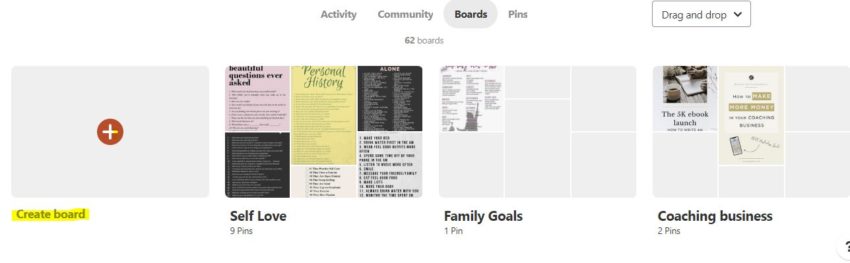
Add a new board, as per this image, and then click the pencil icon next to your board name to edit.
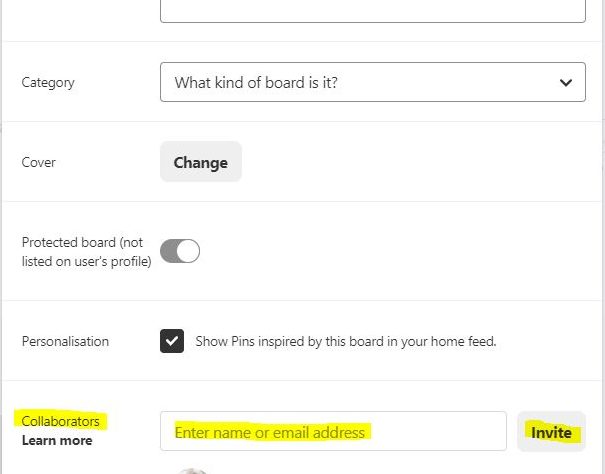
A list of details will pop up about your board for you to fill in. Including options to make your board private, and to invite others. Add in your stylist’s or team member’s details to invite them to view or pin to the board. Now, you can see eachother’s pins and ideas.
2. Use Pinterest As A Sales Tool To Grow Your Photography Business
If you’re new to Pinterest it might surprise you to know you can create Pins that directly earn you income! Here’s how it works.
You sign up for an affiliate program. Ideally, you’ll want to find products that you personally love, and would love to recommend to others.
For example, say you love Gatta camera bags. (We do too)! Well, you would search ‘Gatta camera bags affiliate’ on Google and you’d find this page – a place where you can sign up to receive commission for sharing Gatta camera bags.
The company will give you a unique link that you can share online, and if someone clicks your link and buys a camera bag you get a % of the sale!
So promoting products that you love is a great and easy secondary income stream for photographers. After all, you’d probably share your favourite products with other photographers anyway, you might as well get paid for it!
But how to use Pinterest to share your posts?
Well, you could create a blog post on your website about your favourite Gatta camera bags, and include your affiliate links in the text and images there. You would then create a pin for this post to upload to Pinterest
‘Best Camera Bags ever!’
For example – and people searching for ‘best camera bags’ would find your pin, click on it, and arrive on your post, where they would hopefully go and purchase one of the bags you’ve talked about in your post!
Or, you could create a pin that leads directly to the Gatta bags page, using your unique affiliate tracking link!
This is a quick and easy way to generate sales and commission directly, without even having to create a post!
All you need to do is sign up for the products you’d love to share, and then hop on over to canva.com and create pretty pins for them, and upload to your relevant Pinterest board!
You can of course also use this method to promote your own offers, sales, products, and launches! Got an album discount running?
Create a pin for ‘most beautiful wedding albums’ or ‘best way to display your wedding photos’ and create a blog post with links to your offer!
3. Use Pinterest As The Best Social Media Channel To Get Your Work Found
Uploading your work to Pinterest helps clients to find you. Pinterest is a huge tool for people looking for inspirational photography. Brides use it to find poses, shots they like, etc. I once had a client send me over about 5 vision boards of her wedding photography ideas!
Upload your work as frequently as you can to Pinterest. People searching for terms like ‘beautiful bridal portraits’ or ‘maternity portraits’ will find you and frequently click through to see more images (especially if you include some text like ‘click to see the full shoot’.
Which can lead to them visiting your website, and then booking you (especially if you’re open to travel)!
4. Use Pinterest To Grow Your Photography Blog Traffic
Pinning beautiful pins helps people to notice your profile. When people see your pins, they also see your name below them, which is why choosing your visible Pinterest name is important.
instead of ‘Elsie May’ for example, try something like
Elsie May – Woodland Wedding Photography
or
Elsie May Maternity Photographer California
For example. People will be able to see exactly what you do, rather than assuming your account is a personal account that you use just because you love pinning.
This is a powerful way to drive visitors – and potential clients – to your site.
Of course, you want your pins to send clients to your site too, so make sure you use a strong call to action on your pins themselves.
You could use ‘click to read’ or ‘click here to view this jaw-droppingly beautiful wedding’ for example.
Telling people specifically what to do (click the pin)! means people are more likely to click through to your site, vs just saving your pin to their boards because it looks pretty.
5. Use Pinterest To Find Inspiration For Your Photography Business
We all know Pinterest is full of gorgeous images that we love to look at and save. But have you considered using Pinterest to find inspiration like this?
- Photography challenges, to keep your work fresh and growing
- Books to read, to grow your knowledge, and find new authors you love?
- Motivational ideas, more than just quotes like over on Instagram, find detailed ways to grow your confidence and beat imposter syndrome
- Find bloggers you love. Instagram is great to find microbloggers that uplift and inspire you, but sometimes you just want a little more depth than a surface post, right? Find beautiful blog posts directly on Pinterest, just search for what you want to know!
- Find help with specific questions. Ah, the one thing Instagram can never do! Struggling to remind yourself of the rule of thirds, why you should try shooting at golden hour, or want to know about the latest camera without coming up with a load of tech nerd results all competing in the ‘biggest lens’ competition? 😉
- Pinterest is full of passionate, knowledgeable people and no ‘big lens Bobs’ in sight. Just ask your question in the search bar!
- Pinterest to the rescue. It’s common to go blank under pressure. If you have a big wedding, high-paying client, or important shoot coming up, relieve yourself of the pressure and keep a visual ‘shot list’ to hand in the form of a Pinterest board! Yes, create a private board called Shot List full of images of poses you love, you can even divide it into ‘bridal portraits’ and ‘detail shots’ and ‘group shots’ or ‘maternity’ and so on. Grab your phone and use it whenever you need it!
- Use Pinterest for documents and the ‘tech stuff’. If you want to find a new client contract or email template, this is a great place to begin!
6. Use Pinterest To Collaborate With Your Clients
Pinterest is a great way to share ideas with your clients. They might already have Pins they want to share with you, or you can share boards that show examples of your previous work.
7. Use Pinterest To Enhance Your Learning and Skills
Don’t just rely on someone sharing their latest Instagram update as a way to gain everything you need to grow your business! Find a course, a mentor, a business or life coach. Immerse yourself in blogs and books which grow your confidence and understanding of your subject and of business.
You might also want to consider finding life coaches, not just business coaches. A good life coach can ensure that your personal habits and motivations help propel your business by helping you develop the personal habits needed to stay focused and motivated.
You can, of course, search all of these things on Pinterest! You’d start to discover them by looking for the great content that they are sharing – try searching ‘photography business mentor’ and see what comes up.
8. Use Pinterest To Save Time Marketing
Now we get to the BEST thing about Pinterest – it’s so fast and easy! Here’s how to create a pin and pin it super fast, so you give Pinterest that fresh new content it needs to stay happy, and your profile growing and visible!
- Download the Canva app
- Create a new image in Canva, using a Pinterest template that they provide for you
- Upload your own images and text to use on the template
- Download the newly-created Pin
- Open the Pinterest app
- Search the keyword terms you want to be found for and see what Pinterest generates for you eg if you type in ‘wedding photography’ Pinterest will auto-suggest for you ‘wedding photography California’ or ‘wedding photography bride’ for example
- Get ready to upload your Pin – click the + icon to add it to Pinterest
- Give your pin a title and description, using the auto-suggested keyword terms Pinterest just gave you! (they are telling you what people are searching for, so you want to try to use these terms in your description as it will help you get found, faster)
- Add your website link (copy and paste from your website or blog post)
- Click next
- Choose a relevant board eg ‘bridal portraits’ or ‘sleeping newborn’ or ‘photography tutorials’
- Add your pin!
And that’s it! All done on your phone in the space of about 3-5 minutes. Perfect for squeezing in around naptime!
While it takes the same amount of time as an Instagram post, the smart part is that your pin won’t be buried in the Pinterest feed – people repinning it and Pinterest’s search functionality will ensure it takes on a life of its own. This means your 5 minutes of marketing, stay relevant and found, for months!
So although it takes the same amount of time to create an Instagram post, the impact on your business is much greater in the long run.
So that’s how you can grow your photography business with Pinterest!
Do you use Pinterest for your business, or is your account purely personal? We’d love to know how you use Pinterest or if there are any tips you recommend, leave them in the comments below!
Leave a Reply
Free, takes about half an hour, and you can leave the list whenever you like.
37 words and phrases that give AI copy away, plus the twenty minute fix for the most important line on your site.
March 29th, 2022 at 12:08 pm
[…] You can read more about unique ways to use Pinterest for wedding photographers, (including unique ways to earn extra income using Pinterest) here. […]
April 6th, 2022 at 7:58 pm
[…] 1. Pinterest (our personal favorite, see why here) […]
April 6th, 2022 at 9:28 pm
[…] are some of our top tips on finding your own photography style, so you can grow in confidence, and grow your business by creating a recognizable style that stands […]