NU



Building High-Converting Landing Pages in Flodesk Without a Website
Flodesk offers affordable, transparent pricing that scales with your subscribers. Get 25% off your first year with my code GILLIAN at this link
The digital world has changed. Forget the old headaches, no more struggling with complex WordPress sites or blowing your budget on a web developer. We’re in the “no-code” creator era, and the barriers are gone. If you love beautiful design as much as smart business, Flodesk is your new bestie.
For years, everyone told you to get a “proper” website before building your email list. Domain, hosting, themes, plugins… it was a massive, momentum-killing bottleneck. You don’t need a website to build an empire, you need a simple way to capture interest, deliver value, and talk to your people. You need a killer landing page, and you need that email list.
This isn’t just a guide on which buttons to click. This is your masterclass on the strategy, design, and tech behind a lead-gen machine powered by Flodesk. We’ll dive into why Flodesk crushed the old guard like Mailchimp for creatives, how to write copy that converts, design visuals that scream “you,” and automate the whole process so you can make money (or friends!) while you’re catching Z’s.
Photographer, blogger, designer, coach, doesn’t matter. This report is your definitive roadmap to mastering the Flodesk landing page. Let’s get to work!

Own Your Audience
Before we dive into the “how,” let’s talk about the “why.” Why the email list hustle over social media? Think about the panic when Instagram tanks, or the algorithm shifts and your engagement vanishes. Social media is rented land. You’re building your empire in someone else’s backyard, subject to their constantly changing rules.
Your email list? That’s your owned asset. It’s a direct, unfiltered connection to your people, no algorithms demanding you pay to play. The data is clear: email marketing brings a significantly higher ROI. Getting invited into their personal inbox is an intimate opportunity for deep connection and real conversion.
Flodesk changed the game, realizing that for creatives, the look and feel of the email matter as much as the words. Say goodbye to the clunky, boring interfaces of the past. Flodesk makes your emails look like gorgeous magazine spreads. This design love extends to their landing pages, your 24/7 sales team.
The “No-Website” Funnel
The concept we will be perfecting in this guide is the “No-Website Funnel.” This is a streamlined marketing ecosystem that functions entirely independently of a main website URL.
The architecture of this funnel is elegantly simple:
Traffic Source: Social media (Instagram, Pinterest, TikTok), direct networking, or guest blogging.
The Flodesk Landing Page: A standalone “Full Page Form” hosted on Flodesk’s servers that pitches your offer.
The Exchange: The visitor trades their email address for your “Lead Magnet” (freebie).
The Automation: Flodesk’s workflow engine automatically tags the subscriber and delivers the asset via email.
The Nurture: A sequence of automated emails welcomes the new subscriber and builds trust.
By mastering this loop, you can validate business ideas, launch products, and grow a massive audience before you ever pay for a Squarespace or Showit subscription.
Why Flodesk Wins for Creatives
Diving into a new platform can feel like a lot, right? Trust me, I get it. But here’s the deal: to build anything amazing, we need to get cozy with our tools! Flodesk isn’t your average email platform, it’s truly a unicorn in the massive sea of Email Service Providers (ESPs).
Why do we gravitate toward Flodesk? Because we’re all about that gorgeous, on-brand aesthetic. In the digital realm, we need to build trust instantly, and let’s be real, your beautiful branding deserves a beautiful landing spot. If a user clicks a link from your perfectly curated Instagram and lands on a clunky, outdated, or visually broken form, that connection is gone.
Flodesk’s form builder uses a proprietary layout engine that practically guarantees you won’t “break” the design. While this might feel restrictive if you’re a super-coder, for the creative entrepreneur, it’s a total safety net. It means your margins are always balanced, your fonts are legible, and mobile responsiveness is automatic. Talk about a win!
For those of us who value a modern, chic, feminine, and clean look, Flodesk is the natural choice. It supports custom font uploads and brand color palettes, meaning your landing page will feel like a seamless extension of your brand identity, even if it’s the only web presence you have. Seriously, it’s a dream.
The Lead Magnet
Before we even think about opening the Flodesk dashboard, we need to do the strategic work. Listen, a landing page is only as good as the irresistible offer it presents. You absolutely cannot just whisper, “Sign up for my newsletter,” and expect your dream clients to line up. It’s 2025, and our inboxes? They are sacred spaces. People aren’t handing over access to them without a seriously compelling reason.
This compelling reason is what we call your Lead Magnet (or, you know, your amazing “Freebie”!).
High-Value Lead Magnets
A high-converting lead magnet is all about giving your ideal subscriber a super-quick win. Think of it as a little confidence boost! If you’re an interior designer, ditch the dusty 200-page ebook on architecture history. Instead, offer them the “5-Step Guide to Styling Your Bookshelf Like a Pro”, something they can implement today.
Here are several formats that play beautifully with Flodesk landing pages:
The PDF Guide/Checklist: Hello, classic! It’s a breeze to whip up in Canva and even easier for your audience to consume. Great examples are “The Ultimate Brand Launch Checklist” or “10 Must-Know SEO Tips for Bloggers.”
The Mini-Course: This is my favorite for building trust and routine. Instead of a file, your “product” is a short, valuable series of 5 emails delivered right to their inbox over 5 days.
The Template: If you’re a designer, this is your zone of genius! Offer a free social media template that saves them hours or a plug-and-play Notion dashboard.
The Exclusive Discount: For my e-commerce bosses, keep it simple! A 15% off code is the fastest, most effective way to turn a browser into a buyer.
Speak to Your People
To write killer copy for your landing page, you absolutely have to know who you’re chatting with! Remember how we talked about buyer personas? You’ve probably got a few different tribes in your audience.
Here’s the deal: Don’t try to be everything to everyone with one landing page. The magic of Flodesk is that you can whip up unlimited forms, friends!
- Let’s use a Scenario: You’re a wedding photographer.
- The “Oops” Approach: One landing page for “Brides and Other Photographers.” Yawn.
- The Dream Approach: Landing Page A for “Brides: Download the Wedding Timeline Guide” and Landing Page B for “Photographers: Download my Gear List.”
Each of these pages will speak right to the heart of what’s keeping that specific person up at night. The bride is stressing about the schedule; the photographer is wondering about your kit. Your copy needs to reflect this total glow-up of a distinction!
The Hook and the Promise
Your landing page copy needs to be snappy, you literally have seconds to capture their attention and hook them in.
- The Hook (Headline): Speak right to their struggle or their big goal. Try something like, “Stop Wasting Time on Instagram” (Ouch, that pain!) or “Grow Your Following in 30 Days” (instant win!).
- The Promise (Sub-headline): Get super clear on the payoff. Tell them exactly what they’re getting. “A free 10-page guide to mastering Reels without having to dance on camera.”
- The Call to Action (Button): Make it a no-brainer action. “Send me the Guide” feels way more exciting and active than just “Submit.”
Step-by-Step Tutorial: Building Your Flodesk Landing Page
Now that we’ve nailed down our strategy; our ‘Who’ and our ‘What’, it’s time to talk about the how. This is where the magic happens! This section is your comprehensive, step-by-step walkthrough of the Flodesk interface. Go ahead and open up your Flodesk account and let’s get this landing page built.
Navigating to Forms
Log in to your Flodesk dashboard! Seriously, it’s about to get good. Your top navigation bar is your command center. You’ll spot: Emails, Forms, Workflows, Audience, and Checkouts.
Now, go ahead and click on Forms. This is where the magic (your landing page!) lives.
Look for the + New Form button in the top right corner and give it a click!
Selecting the Right Form Type
Flodesk offers four distinct form types:
- Popup: Appears over a website.
- Inline: Embedded into a blog post or footer.
- Full Page: A standalone URL. (This is what we want).
- Link in Bio: A mobile-optimized list of links + opt-in.
For this guide, we are focusing on the Full Page form. This option generates a dedicated URL that functions as a mini-website. It is the perfect solution when you don’t have a domain of your own.
Action: Select Full Page from the menu on the left.
Choosing a Template
Flodesk offers a whole library of absolutely gorgeous templates! Seriously, don’t get too hung up on the colors or images you see in the preview, we can totally change all that. Instead, let’s focus on the Layout.
- Are you going for that chic, split-screen vibe (Image on the left, text on the right)?
- Maybe you prefer a clean, minimal look, centered, with no image distractions?
- Or are you loving that magazine-style, editorial layout?
Pick the template that truly vibes with the assets you already have. If you’ve got a stunning vertical photo of your product, that split-screen layout is going to be a total winner! If strong imagery isn’t your thing right now, go for a typography-focused, minimal layout, because your words are powerful!
Action: Hover over a template and click Customize it!
Segment Selection
Before you can edit a single pixel, Flodesk will ask you a critical question: “Choose a segment.”
Here’s where many of you get tripped up. A Segment in Flodesk is like your digital filing cabinet, it’s how you organize your people. When someone types their email into this landing page, which “bucket” should they drop into
Best Practice: Create a brand new, specific segment for every unique lead magnet.
- Do not just dump them into “Newsletter.” That’s too generic!
- Create a segment called Freebie: Brand Checklist or Waitlist: Course Launch.
This granularity allows you to track exactly where your future bestie came from. If you run a promotion on Instagram and another on Pinterest, you can even create Instagram Leads and Pinterest Leads segments to see which one is performing like a rockstar!
Action: Type a new name to create a new segment (e.g., Summer Guide Freebie) and click Save.
Customizing Your Page
Welcome to the editor. If you have used tools like Canva, this will feel familiar. The interface is “What You See Is What You Get” (WYSIWYG).
The Image Block
Click on the image placeholder. A sidebar will appear on the right.
- Upload: Upload your own image.
- Stock: You can also search Unsplash directly from the editor for high-quality stock photography.
- Dimensions: For full-page split forms, your image should ideally be vertical (portrait) with an aspect ratio of 2:3 or 9:16. For centered images, squares (1:1) often work best. Keep file sizes under 2MB to ensure the page loads quickly.
- Alt Text: Don’t forget to add “Alt Text” for accessibility. This describes the image to screen readers (e.g., “Woman working on laptop with coffee”).
The Text Blocks
Click on the text to edit it.
- Font Matching: If you have set up your Brand Preferences in your account settings, your brand fonts will appear at the top of the font list. If not, browse Flodesk’s extensive library of serif, sans-serif, and script fonts.
- Hierarchy: Ensure your headline is the largest element (e.g., Size 48px+). Your sub-headline should be smaller (e.g., Size 18-24px).
- Color: Use high-contrast colors. If your background is white, use dark grey or black text. If your background is dark, use white text. Legibility is key to conversion.
The Input Fields
Click on the form fields (where users type their email).
- Fields: By default, it asks for Email. You can add “First Name” and “Last Name.”
- Strategy: Only ask for what you need. Asking for “First Name” is great for personalizing future emails (e.g., “Hey Sarah!”). Asking for “Phone Number” or “Last Name” creates friction and lowers conversion rates. Stick to Email + First Name.
- Styling: You can change the shape of the boxes (pill shape, rectangle, line only) and the border colors to match your aesthetic.
The Call to Action (Button)
This is the most important pixel on the page.
- Color: Make it pop. It should be a distinct color from the background.
- Shape: Rounded corners often feel friendlier; sharp corners feel more serious.
- Copy: Change “Subscribe” to something more enticing like “Get the Freebie,” “Join the Party,” or “Send it my way!”
Mobile Optimization Check
Flodesk is responsive by default, but you must check your work. In the top right corner, click the Mobile icon.
- The Disappearing Image: On mobile, Flodesk sometimes hides the large hero image to save space, focusing on the text and form. If your image is critical to the context, check the settings in the sidebar to ensure “Show image on mobile” is toggled on.
- Text Sizing: Sometimes a headline that looks great on desktop takes up the whole screen on mobile. You may need to adjust the font size specifically for the mobile view if the template allows, or find a happy medium.
Post-Submission Behavior (Success Message)
What happens after they click the button? Click on the background or the Success Message tab in the sidebar.
Option A: The Simple & Sweet Success Message: Poof! The form disappears, and a little message pops up: “Woohoo! Check your inbox, babe.” This is your go-to, no-fuss option.
Option B: The Next Level Redirect to URL (This is the pro move!): Ready to roll out the red carpet? Send your new subscriber straight to a totally different URL.
- Use Case: Direct them right to your super-engaged Instagram profile.
- Use Case: Send them to a “Tripwire” offer (a cheeky, low-cost product checkout page) to snag an immediate sale. Gotta love passive income!
- Use Case: Guide them to a specific blog post you know they’ll adore.
Flodesk for E-Commerce
Flodesk is evolving beyond just email. The “Checkout” feature is a total game-changer, allowing you to sell directly from your beautiful landing page.
The Sales Page Funnel
Instead of a freebie, you can use a Full Page Form to sell a digital product.
Process:
- Create a Checkout in Flodesk (product setup, price, stripe connection).
- Create a Full Page Form as a “Sales Page.”
- Link the Form’s button to the Checkout URL.
This allows you to build a complete e-commerce store for digital downloads without Shopify or WooCommerce.
Interactive Elements
Flodesk updates are bringing some fun, interactive elements to the party, like Countdown Timers and Polls!
Countdown Timers: Adding one of these babies to your landing page (think: “Offer expires in 24 hours!”) creates that good kind of psychological scarcity, a little nudge that totally boosts your conversion rates!

Polls: While they’re mostly email superstars, using the data you gather from a quick survey can seriously inform your landing page copy. It’s the best way to make sure you’re truly speaking the language of your dream customer!
Advanced Configuration: Compliance and Sharing
The tough building work is all done! Now for the fun part: making sure it’s super safe and ready for everyone to use. Time for the final safety check!.
The Double Opt-in Decision
In the settings panel of your form, you will see an option for Double Opt-in.
- What is it? When someone signs up, they receive an email saying “Confirm your subscription.” They must click that link to be added to your list.
- Why use it? It prevents spam bots from filling your list with fake emails. It also improves your “sender reputation” because it proves your subscribers definitely want to be there.
- Why avoid it? It creates friction. Some real humans will forget to click the confirmation link and will never get your freebie.
- Recommendation: If you are just starting, you can leave it OFF to maximize growth. If you are getting hit with spam, turn it ON. If you are in strict GDPR zones (Europe), it is highly recommended to leave it ON or use the specific GDPR checkboxes.
GDPR and Marketing Consent
If you have subscribers in the EU, you need to comply with GDPR (thrilling, I know). Flodesk allows you to add a “Marketing Consent” checkbox to your form.
Implementation: In the form builder, toggle Preferences or Consent options. This adds a checkbox saying “I agree to receive marketing emails.” This is not the sexiest design element, but it protects you legally.
Customizing the URL and Social Preview
This is the step most people forget! When you share your link on Facebook, what does the preview card look like?
Click Settings > Link Preview (or similar metadata tab depending on the current UI version).
Image: Upload a specific image (1200x630px) that serves as a banner. Do not leave this blank, or social platforms will pull a random or broken image.
Title: Write a catchy title (e.g., “Free Brand Checklist for Creatives”).
Description: Write a 1-2 sentence hook.
Customizing the Link: Flodesk generates a random URL like flodesk.com/c/8d9s7f. You cannot change the flodesk.com part without a custom domain integration, but you can usually customize the slug (the end part) in the sharing settings to something like my-flodesk.com/branding-checklist.17 This looks much more professional in your Instagram bio.
Delivering your Content
Your landing page is live. People are signing up. Now, how do they actually get that PDF? Are you going to be in your inbox emailing it to them manually? Uh, no, we’re using Workflows!
This is where the magic happens and what makes your business actually scalable.
Creating a Workflow
- Go to the Workflows tab in the top navigation.
- Click + New Workflow.
- Choose the Lead Magnet Delivery template (or start from scratch).
The Trigger
Every automation needs a “Trigger”, the event that kickstarts the machine.
Old Way: Trigger: “Subscriber added to Segment.”
New Way (Better): Trigger: “Subscriber completed Form.”Flodesk recently updated their logic to allow you to trigger workflows directly from a specific form completion. This is cleaner. Select the specific Full Page Form you just built.
The Delivery Email
The first step in the workflow should be an email.
Click the + sign and select Email.
Design: Create a simple, beautiful email. “Hey [First Name], here is that guide you asked for!”
The Download Link: This is the critical part.
- Create a button that says “Download Guide.”
- In the button settings on the right, change Link to Attach File.
- Upload your PDF directly to Flodesk (up to 10MB).
Note: If your file is a video or a huge zip file, upload it to Google Drive or Dropbox first, and paste the share link into the Flodesk button URL field instead.
The Nurture Sequence
Don’t stop there. Add a Time Delay of 1 or 2 days, and then add another email. Ask them if they had a chance to read the guide. Introduce yourself. Share your top 3 blog posts. This turns a cold lead into a warm friend. Build relationships, not just transaction lists.
Getting Traffic to your Flodesk Landing Page
You built it. Now, will they come? Not unless you tell them! Since you don’t have a website with organic SEO traffic yet, you have to be the engine.
The “Link in Bio” Strategy
If you are active on Instagram or TikTok, your bio link is prime real estate.
Option A: Paste your Full Page Form URL directly.
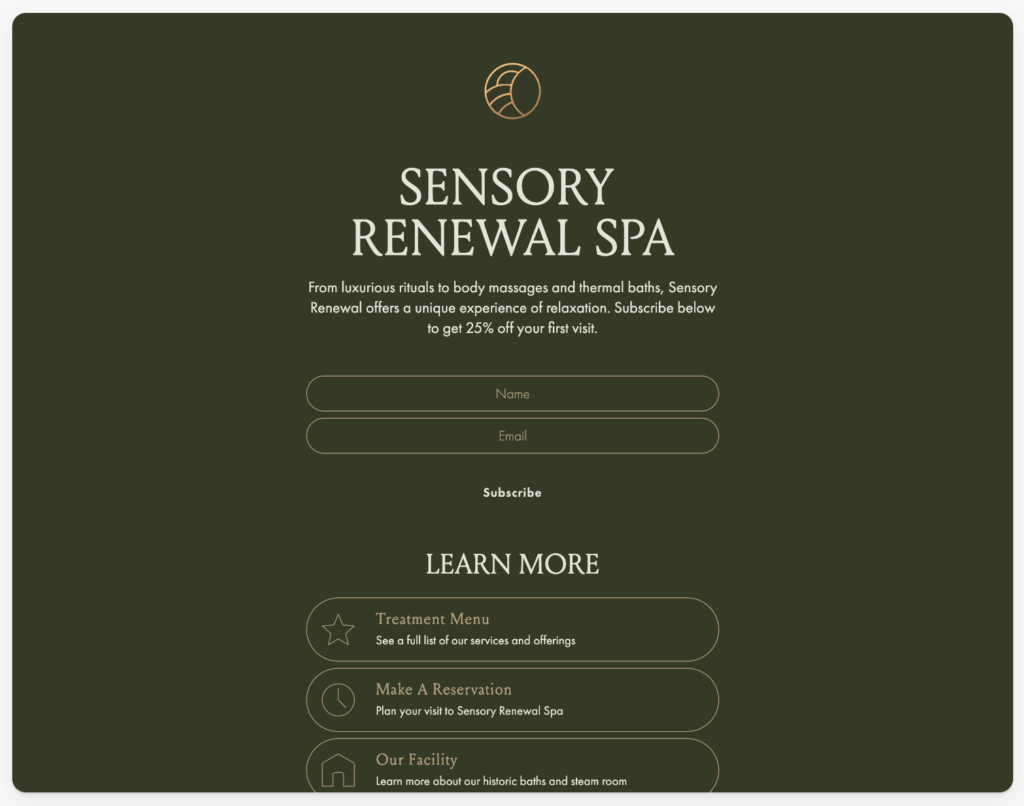
Option B: Use Flodesk’s Link in Bio form type. This is a special form that looks like Linktree. It has buttons for “My Blog,” “Shop,” “Youtube,” AND a built-in newsletter signup box at the top. This is highly recommended for creators because it captures leads without forcing them to click away to a separate page.
Pinterest Marketing
Pinterest is a search engine, not a social network.
- Create a vertical graphic (1000x1500px) in Canva that advertises your freebie. “5 Ways to Style Your Home (Free Guide).”
- Link that Pin directly to your Flodesk Landing Page URL.
- This is a powerful way to drive evergreen traffic to your list for years.
Content Integration
Even without a website, you likely produce content somewhere.
- YouTube: Put the link in your video description.
- Guest Blogging: If you write a post for someone else’s site, ask them to link your bio to your Flodesk page.
- Email Signature: Put the link in your personal Gmail signature.
Troubleshooting
Even the pros hit snags. Here is how to fix the most common issues.
| Problem | Cause | Solution |
| “I signed up but didn’t get the email.” | Double Opt-in is ON, or Workflow is not published. | Check if the Workflow is set to “Published” (it must be live). Check if Double Opt-in is on; if so, check your spam for the confirmation email. |
| “My image looks blurry.” | Image resolution is too low. | Ensure your image is at least 1500px wide, but under 2MB. Use high-quality JPEGs. |
| “The mobile version cuts off my face.” | Aspect ratio mismatch. | The mobile view crops the center. Ensure the focal point of your image is in the middle, or turn off the image on mobile. |
| “I can’t change the font size on just one word.” | Editor limitation. | Flodesk applies styles to whole blocks. To style one word differently, use the “Italic” style and customize the Italic font setting to be a different font/color. |
It All Starts with One Page
The journey of a thousand subscribers begins with a single landing page. By utilizing Flodesk, you are choosing a path that honors your brand’s visual identity while leveraging powerful automation tools that were once reserved for those big-shot enterprise corporations.
You do not need to wait for the perfect website. You do not need to wait for a developer. You have everything you need right now. The combination of a strategic lead magnet, a beautiful Flodesk Full Page form, and an automated delivery workflow is a complete business funnel in its own right, it’s like magic!
So, go create. Experiment with layouts. Write copy that sounds like you. And most importantly, hit publish. Your dream audience is waiting, go get ’em!
Flodesk offers affordable, transparent pricing that scales with your subscribers. Get 25% off your first year with my code GILLIAN at this link
Flodesk Landing Page FAQ:
Absolutely. This is Flodesk’s superpower. When you select a Full Page Form or a Link in Bio Form, Flodesk hosts the page on their own secure servers. You get a unique URL (like flodesk.com/c/your-link) that you can share instantly. You do not need WordPress, Squarespace, or a domain name to start collecting emails today.
As of December 2025, Flodesk introduced a new tiered pricing model.
– Lite Plan ($19/mo): Perfect for beginners. Unlimited emails and forms, but limited to 1 workflow.
– Pro Plan ($25/mo): The growth unlock. Unlimited workflows (vital for complex funnels) and advanced analytics.
– Everything Plan ($49/mo): Includes Flodesk Checkout for selling digital products directly.
Tip: If you are just starting, the Lite plan is the most affordable way to get a beautiful landing page liv
Sort of! While you can’t map a root domain (like www.mybrand.com) directly to a Flodesk form without embedding it, you can customize your Flodesk Handle. This changes your link from a random string of characters to yourbrand.myflodesk.com/freebie-name. It looks professional, trustworthy, and is free to set up in your account settings.
Don’t let your form be invisible to Google! In the form builder, click Settings > Link Preview. Here you must fill in:
Meta Title: Use keywords like “Free Wedding Photography Guide.”
Meta Description: A 150-character summary enticing people to click.
Social Image: Upload a specific graphic so your link looks good when shared on Facebook or iMessage.
Think of a Full Page Form as a specific sales page for one thing (like your freebie). Think of a Link in Bio form as a mini-menu for everything (your blog, your shop, your YouTube channel) that also includes a signup box at the top. Use the Full Page for ads and specific pins; use the Link in Bio for your Instagram profile.
Yes! Scarcity converts. Flodesk now has a Countdown Timer form block. You can set it to a fixed date (e.g., “Cart closes Friday!”) or personalized for each subscriber. This is amazing for waitlists or limited-time discounts.
You don’t send it manually! You set up a Workflow.
Trigger: “Subscriber completes Form.”
Action: Send Email.
Inside the Email: Link your button to “Attach File” and upload your PDF. Flodesk handles the hosting and delivery instantly.

PLEASE COMMENT BELOW