This is one of my favourite spaces to share our new branding and website launches, along side some fantastic business information.
The Duex Float Portable Monitor: A Handy Second Screen

I was kindly gifted a Duex Float portable monitor by Mobile Pixels. All thoughts and opinions in this post are my own.
Mobile Pixels kindly gifted me their Duex Float portable monitor, and after putting it through its paces over the last few weeks, both at home and out and about, I have a few thoughts. If you’ve ever found yourself desperately trying to juggle tabs, emails, or edits on a single laptop screen and dreaming of more space, this could be just the solution.
It’s designed to give you that dual-screen feel without having to fully commit to a home office setup. But like with anything, there are a few quirks you’ll want to know before diving in.
First impressions (and a bit of drama)
Now, full transparency, my first Duex Float didn’t exactly arrive in one piece. When the parcel showed up, it looked like it had been through a battlefield. The box was torn open, the packaging was falling apart, and the screen inside was completely smashed. Not ideal. I was gutted, thinking that was the end of it.
But here’s where Mobile Pixels really shone. I contacted them and explained what had happened, and honestly, I was blown away. No arguments, no hoops to jump through, they shipped me a new monitor straight away, and it arrived quickly and perfectly intact. That kind of customer service is rare, and it made me feel so much more confident about the brand as a whole. Massive gold star from me.
Setting it up
Once the new screen arrived, I was excited to get it set up and running. And good news, it really was as easy as they claim.
The Duex Float attaches to your laptop using four small magnets, which come with adhesive stickers and a really straightforward guide. You just stick them to the back of your laptop, line everything up, and you’re done. Once the magnets are on, the monitor clicks into place securely, but can still be removed easily when you need to pack it away.
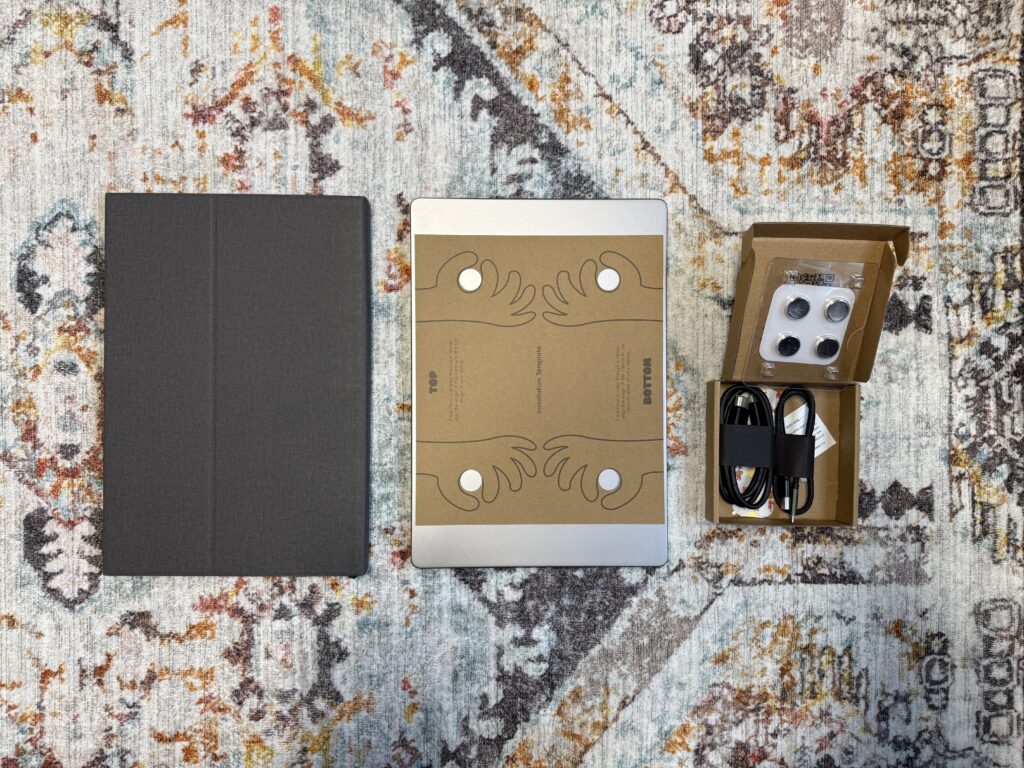
From there, it connects to your laptop with a single USB-C cable, no power brick, no extra mess. Just plug it in and off you go. I loved how hassle-free it was, especially compared to other portable monitors I’ve tried in the past that required two cables or their own power supply. This is as streamlined as it gets.
What I loved
I’ve been using the Duex Float for a few weeks now, mostly at my desk but also in a few coffee shops and co-working spots. And honestly, it’s made a big difference to how I work. Here are the standout things I really liked:
1. Truly portable
The whole point of a second screen is to make multitasking easier, and this one actually makes that possible on the go. It just (and I mean just) fits into my laptop sleeve along with my MacBook, so I can carry it around without needing a separate bag or case. It’s slim and folds flat, which is a huge plus.
2. One cable, no mess
The USB-C to USB-C connection is beautifully simple. I didn’t have to fiddle around with settings or drivers, my MacBook recognised it straight away. And because it draws power from your laptop, there’s no need to lug around another plug or worry about charging it.
3. Instant extra screen space
Whether I’m editing photos, writing blog posts, replying to emails or browsing Pinterest for inspiration, having an extra screen is genuinely a game-changer. It makes jumping between tasks so much quicker, and I find I’m far more productive with the extra space.
4. Great value
At around £200, the Duex Float feels like a bit of a bargain. Especially when you compare it to the cost of setting up a second monitor and stand for your desk, or investing in a full dual-screen system. For the flexibility it gives you, it’s brilliant value for money.
5. Customer support
As I mentioned earlier, the support I received when my first screen arrived broken was second to none. I know that doesn’t seem like part of the product, but honestly? It made a big impression. Buying from a brand that genuinely helps when things go wrong makes a huge difference.

A few things to keep in mind
Of course, it’s not perfect, and I always like to give the full picture. Here are a few things I think are worth knowing:
1. It’s a little heavy
The monitor itself is solidly built, which is great for durability, but once it’s attached, you do notice the extra weight. It weighs about the same as my MacBook Pro, so it’s not featherlight. I didn’t mind it when working at a desk, but I definitely noticed the difference when carrying it around all day.
Note: this is no different from any other second screen I’ve used.
2. It’s not great for sofa sessions
Because of the weight, it really only works well when your laptop is on a flat, sturdy surface. The Duex Float comes with a clever little support bar that props the screen up and stops your laptop lid from bending backwards. Very smart. But that also means it’s not exactly couch-friendly. If, like me, you love to work curled up on the sofa with your laptop on your knees, this one might not be the best fit for that. It’s very much a desk-day tool.
3. Slight resolution mismatch on Mac
This could just be my setup, but I couldn’t get the screen resolution to match exactly with my MacBook Pro. Everything displays fine, but the cursor doesn’t line up perfectly across the two screens, which can be slightly frustrating when moving between windows. It’s a small thing, but worth mentioning if you’re a bit picky about screen alignment (guilty).
4. It attracts attention
This one made me laugh, the first time I used it in a coffee shop, no fewer than three people came over to ask what I was doing. Apparently, it looked like I was setting up a NASA control centre or prepping for a major stock market crash. Not quite the minimalist look I usually go for when working out and about. That said, if you don’t mind a few curious glances (or you’re working in a more corporate setting), it’s not really an issue.

Final thoughts
All in all, the Duex Float is a clever little piece of kit that delivers exactly what it promises. It’s not the lightest or most subtle tool in the world, but it gives you proper screen space wherever you go, and for anyone who works remotely, hot-desks, or just needs a bit more visual breathing room, that’s a massive win.
It’s not going to be perfect for everyone. If you mostly work curled up on the sofa or care deeply about keeping your setup as lightweight and low-profile as possible, you might find it a bit bulky. But if you’re looking for a portable second screen that’s easy to set up, reliable, and makes a noticeable difference to how you work, the Duex Float is definitely worth a look.
Would I recommend it? Yes, absolutely, especially if you’re someone who likes to mix up your work environments or needs a bit more screen space without committing to a full office overhaul. And honestly, just for the customer service alone, I’d buy from Mobile Pixels again in a heartbeat.
Leave a Reply
Free, takes about half an hour, and you can leave the list whenever you like.
37 words and phrases that give AI copy away, plus the twenty minute fix for the most important line on your site.
PLEASE COMMENT BELOW