This is one of my favourite spaces to share our new branding and website launches, along side some fantastic business information.
How Yoast SEO Can Help Your Website Thrive

You’ve made your website – fine-tuned the graphics, filled it with valuable, quality content, and now you want to rank on the first page. Well, either this will take a hefty investment into search engine marketing (SEM) or get street-savvy and use optimisation techniques to finesse your content into rank-worthy material. One of the best (and easiest) ways to achieve this is by using the search engine optimisation (SEO) plugin: Yoast.
About Yoast
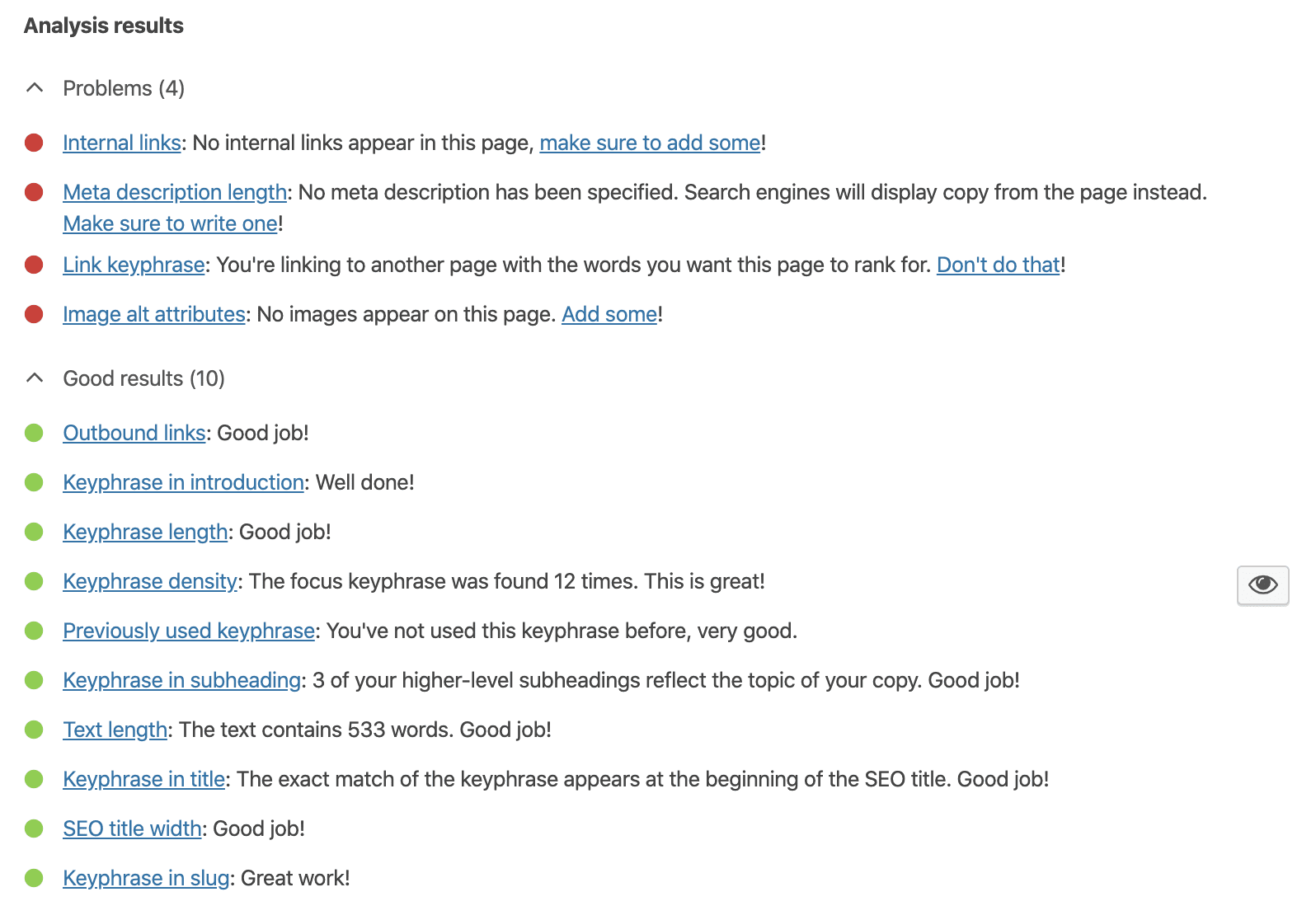
If you are new to running a website, you may be wondering what the Yoast SEO plugin is and how it functions. Essentially, it gives you a break down of everything you need to do on the SEO side of your content. It quickly calculates the ratings of your pages and posts, factoring in everything from keywords to readability. Through colour-coded sections, it gives you a checklist of items that need improvements and those which are working for you. If you reach double-green, you are in the zone. Orange marks troublesome areas that need to be addressed and red denotes actual errors (if you see grey, it means you haven’t yet started).
Key Features & Benefits
While one of the key draws of Yoast is its utter user-friendliness, there are some other significant benefits such as:
- Keeping you in-the-loop on content duplicates
- Allows you to preview your pages on Google
- Informs search engines of what to look for on your pages
- Maintains analytics in keeping with current algorithms
Setting Up Yoast
Simple to install, the first step is downloading and activating the plugin. In panel to the left of your WordPress site, go to the plugins tab, type in Yoast, and follow the prompts. So long as you choose to run it actively, it is at the bottom of your pages.
Taking it Post by Post
As you add pages and content, ensure you follow best practices. Use your focus keyword in the material, providing a minimum of 300 words per post (and upwards of 2,000 when possible). Keep it short and simple for readability with bright headings and tags. Include images (credited, of course) and helpful backlinks. The plugin will keep an eye on your effectiveness and let you know where there is room to improve.
Analytics & Understanding
Yoast is an excellent source for understanding keywords. Submit your key-phrase through the focus tab to optimise your site’s rankings when the topic is googled. Go step by step through the Yoast tabs, from title to meta description (and always adhere to the character count and formatting suggestion). Plug the focus phrase in both the title and the meta for best results. Yoast runs analytics to take the guess-work out of optimisation, so follow its proven advice on everything from keywords to readability (you’ll be glad you did).
A Final Word on Yoast
As with most things in life, the Yoast SEO plugin is most effective when used consistently. Ensure that you keep this software active on all your posts and follow the advice. In just about every case, it is possible to get a double green stamp of approval. So long as you continue to provide high-quality content and maintain your keywords and readability, Yoast will help make your WordPress site successful.


March 15th, 2020 at 10:05 am
[…] One of my favourite things about Showit is that the blog function links in with WordPress. This meaning you can use the Yoast plugin to boost your pages even more. You can read all about Yoast SEO here! […]
March 16th, 2020 at 10:04 am
[…] SEO is the backbone of attracting traffic and leads to your website. If you require inbound traffic to profit from your business, the offerings through a standard, free WordPress.com website may not be adequate. The self-hosted platform lets you use third-party plug-ins on top of its already extensive SEO options and analytical features (which is also lacking in the WordPress.com platform) so that you can better engage your audience and grow conversions. You can read more about WordPress SEO here. […]
March 1st, 2022 at 7:51 pm
[…] Improving on-page and off-page SEO […]
March 9th, 2022 at 9:06 pm
[…] the activity. Always have a goal in mind when you work with bloggers. It doesn’t matter if it’s boosting your SEO or making sales. You should always start with […]
March 29th, 2022 at 12:11 pm
[…] Google makes that super hard to do SEO research to get your blog and website featured, Pinterest makes it soooo easy! Which is why […]